When ChatGPT, Perplexity, or Gemini answer a question about your industry, they do not read one of your pages in isolation. They follow your URLs, map your link graph, choose which version of each page to trust, and decide based on that structure whether your business is worth citing. Four things decide that outcome: the parameters on your URLs, the canonical tags that resolve duplicates, the internal links that distribute authority across your site, and the broken paths that break the chain. None of them is new. All of them matter more in 2026 than they ever did.
This guide treats URL architecture and link structure as one system, because AI platforms treat them that way. Get it right and your site behaves like a coherent body of knowledge AI can cite with confidence. Get any one piece wrong and AI agents pick someone else not because your content is worse, but because they could not determine what to trust.
Key Takeaways
- URL parameters, canonical tags, internal links, and broken paths are a single system AI platforms read all four together to decide which sites to cite.
- Duplicate content from unmanaged URL parameters is one of the most common technical SEO problems, and Semrush's canonical URL guide explains why filter-driven e-commerce sites are especially exposed.
- Strategic internal linking redistributes authority across your site and signals topical depth that AI platforms use to decide who to cite see Semrush's internal links guide for the mechanics.
- Orphan pages with zero internal links are invisible to crawlers and receive no authority, regardless of content quality.
- Google's December 2025 documentation update clarified that pages returning non-200 status codes may have rendering skipped broken links do not just lose traffic, they remove pages from consideration.
- AI-generated answers cite only a handful of sources. Any ambiguity in your URL structure, any gap in your link graph, any dead end in your site increases the chance an AI picks a competitor instead.
Part 1 URL Foundations: Parameters and What They Do to AI Visibility
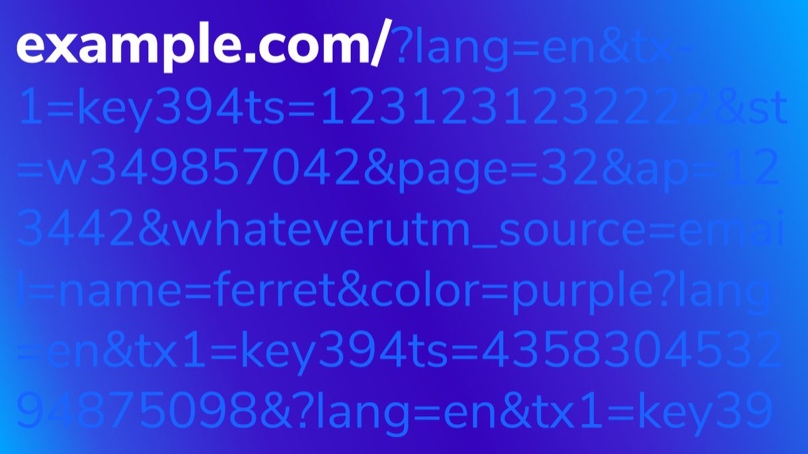
URL parameters are the key-value pairs that appear after the ? character in a web address. They consist of key-value pairs separated by & symbols, telling the server or browser how to modify the page content.
Here is the anatomy of a parameterized URL:
https://example.com/products?category=shoes&sort=price&color=blue
In this example, category=shoes filters products to the shoes category, sort=price orders results by price, and color=blue filters to blue items only. The base URL (https://example.com/products) stays the same, but the parameters change what the page displays. This is how e-commerce sites serve thousands of filtered views from a single page template and why parameter management matters for both traditional SEO and AI discoverability.
Active vs Passive Parameters
URL parameters fall into two broad categories. Active parameters modify the page output sorting (?sort=price-asc), filtering (?category=electronics&brand=sony), pagination (?page=3), and search queries (?q=wireless+headphones). Passive parameters track behavior without changing content UTM tracking (?utm_source=newsletter), session IDs, referral codes, and A/B test variants.
The distinction matters because active parameters create genuinely different page content, while passive parameters create duplicate pages with identical content each accessible at a different URL. Both search engines and AI crawlers need clear signals to determine which version is authoritative.
Why Unmanaged Parameters Break AI Visibility

Unmanaged parameters create three problems that directly impact AI citation decisions.
Duplicate content. When parameters generate multiple URLs that serve the same content for example, ?sort=price and ?sort=date showing identical products search engines and AI agents struggle to determine which version is authoritative. AI agents face the same challenge when synthesizing answers from web sources: they need to identify the single most authoritative version of a page. Duplicate parameter URLs create ambiguity that can exclude your content from AI-generated responses entirely.
Crawl budget waste. Search engines and AI crawlers allocate a finite crawl budget to each site. A site with 500 products and 10 filter combinations could generate 5,000+ parameter URLs, most serving near-identical content. Crawlers spend their budget on parameter permutations instead of discovering your most valuable pages.
Diluted signals. Backlinks, social shares, and engagement metrics that should consolidate on one canonical URL get scattered across parameter variations. For businesses working to improve their AI search visibility, unmanaged parameters quietly undermine the structured signals AI agents rely on for citation decisions.
According to Google's URL structure documentation, keeping URLs simple and descriptive helps both search engine crawlers and AI agents understand your content hierarchy. That principle sets up everything that follows because the single most important tool for telling AI which URL is real is the canonical tag.
Part 2 Canonical URLs: Telling AI Which URL Is Real
A canonical URL is the preferred version of a webpage. When your site serves the same content at multiple addresses through URL parameters, session IDs, tracking codes, HTTP versus HTTPS, or www versus non-www variations the canonical tag tells search engines and AI crawlers which one to index.
You declare it with a rel="canonical" link element in the page's <head> section:
<link rel="canonical" href="https://example.com/products/blue-widget" />
This tells Google, Bing, and AI crawlers: "This is the real page. If you find this content elsewhere, point all signals here." Without it, search engines must guess which version matters. They often guess wrong splitting your link equity, diluting your rankings, and indexing the version you least want people to find.
Why Canonicals Matter to AI Systems
Canonical tags serve three critical functions.
They consolidate link equity. When backlinks point to different versions of the same page /products/blue-widget, /products/blue-widget?utm_source=newsletter, /products/blue-widget?ref=homepage a canonical tag funnels all that authority to one URL. Without consolidation, each version competes against itself.
They prevent duplicate content confusion. Duplicate content from URL parameters, session IDs, and tracking codes is one of the most common technical SEO issues. Semrush's canonical URL guide walks through the most common scenarios filtered navigation on e-commerce sites being one of the worst offenders. Canonical tags are the primary mechanism for telling search engines which duplicate to ignore.
They signal authority to AI systems. As Search Engine Land's 2026 canonicalization guide notes, generative AI engines rely on clear canonical signals to determine which URLs to trust, which versions to ingest, and which pages to surface as authoritative answers. A page with a broken canonical may never appear in an AI-generated response not because the content is poor, but because the AI could not determine it was the real version.
Traditional search engines treat canonical tags as a strong hint. AI platforms are less forgiving. Conflicting canonical signals or missing ones increase the chance that the AI system either picks the wrong version or skips your content altogether. For a broader look at how technical signals influence AI citation, see our analysis of how technical SEO factors impact AI search visibility.
Canonical Best Practices
- Self-referencing canonicals on every page. Even pages without obvious duplicates should include a canonical tag pointing to themselves. This eliminates ambiguity when other signals send conflicting messages.
- Use absolute URLs, not relative paths. Always specify the full URL including protocol and domain. Relative paths can be misinterpreted by crawlers, especially when content is syndicated or cached.
- Be consistent with protocol and domain. Pick one version HTTPS or HTTP, www or non-www and use it everywhere. Your canonical tags, internal links, sitemap entries, and redirects should all reference the same format.
- One canonical tag per page. Multiple canonical tags create conflicting signals. Search engines may ignore all of them. Audit your templates to ensure CMS plugins are not injecting additional tags.
- Handle pagination correctly. The old
rel="prev/next"approach is deprecated. Each paginated page should have a self-referencing canonical. Collapsing all pages to Page 1 makes content on deeper pages invisible. - Apply noindex on tracking-only parameters. Session IDs, A/B test variants, and internal tracking parameters should carry
noindex. For active parameters like sorting and filtering, canonicals are the better choice. - Use server-side rendering for parameterized views. If your site relies on client-side JavaScript for parameter-based filtering, AI crawlers may not execute the JavaScript and miss the content entirely.
The Six Common Canonical Mistakes
Most canonical problems fall into one of six patterns. Each has a direct fix.
1. Missing canonical tags. Pages without any canonical tag force search engines to guess the preferred version. Fix: Add self-referencing canonical tags to every page. Most CMS platforms handle this as a global setting Yoast SEO, Shopify, and most frameworks support it out of the box.
2. Canonical pointing to a redirected URL. If your canonical points to a URL that 301-redirects elsewhere, you send crawlers through a chain of conflicting signals. Fix: Update canonical tags to point to the final destination URL. After any site migration, audit canonicals alongside your redirect map.
3. Canonical pointing to a 404 or non-existent page. A canonical tag pointing to a broken URL tells search engines the authoritative version does not exist. Neither the canonical target nor the current page gets properly indexed. Fix: Run a site-wide crawl with Screaming Frog or Semrush Site Audit to find canonicals resolving to 4xx or 5xx status codes.
4. HTTP canonical on an HTTPS site. Pointing HTTPS pages to HTTP canonicals creates a redirect loop in the canonical chain. Fix: Ensure every canonical tag uses https://. This is often a hardcoded protocol in template files that was never updated after the HTTPS migration.
5. Conflicting canonical and hreflang tags. On multilingual sites, each language version should canonicalize to itself. If the French version has a canonical pointing to English, the hreflang says "this is the French version" while the canonical says otherwise. Fix: Every hreflang variant must have a self-referencing canonical. Hreflang handles language targeting; canonicals handle URL consolidation.
6. Canonicalizing non-duplicate content. Pointing unrelated pages to a single "main" page all blog posts pointing to the blog index, for example tells search engines to ignore the individual pages. Fix: Only use cross-page canonicals between pages with substantially identical content. For unique content, use a self-referencing canonical.
A canonical audit belongs in every routine SEO audit checklist. Crawl your site and filter for missing, duplicate, or non-indexable canonicals. Check Google Search Console's URL Inspection tool to see whether Google accepted your declared canonical or chose a different one. Validate against your sitemap every URL there should match the canonical on that page.
Canonicals resolve which URL is authoritative. But authority still has to flow and that flow is built entirely by internal links.
Part 3 Internal Linking: Making Your URLs Discoverable and Authoritative
Internal links are the connective tissue of your website. Every link from one page to another on the same domain tells search engines what matters, how topics relate, and where authority flows. Get internal linking right and your pages rank higher, your content gets crawled faster, and AI search engines can map your expertise. Get it wrong and even strong content sits invisible.
An internal link is any hyperlink pointing from one page on your domain to another page on the same domain. That includes navigation menus, footer links, sidebar links, and most importantly contextual links embedded within body content. Internal links are entirely within your control, which makes them one of the highest-leverage optimization tactics available.
Why Internal Links Matter for AI Visibility
Internal links serve three functions that directly affect your search performance.
They distribute authority across your site. Internal links pass a portion of each page's authority to other pages on your site. Without deliberate linking, authority concentrates on a few pages while the rest starve. Semrush's internal links guide explains how authoritative pages can strengthen weaker ones through deliberate linking that redistribution is what turns a collection of pages into a site with real link equity to spend.
They help crawlers discover and index content. Google's crawlers follow links to find new pages. A page with no internal links pointing to it an orphan page may never get crawled at all, regardless of content quality. Adding internal links from existing pages to your latest blog posts ensures they enter Google's index quickly.
They signal topical relevance to AI systems. AI search engines do not just evaluate individual pages they evaluate how your content connects. A well-linked cluster of pages on a single topic signals deep expertise, making your site more likely to be cited in AI-generated answers. If your content strategy builds topical depth but your internal links do not reflect those connections, AI systems miss the signal.
Types of Internal Links

Not all internal links carry the same weight. Navigational links (header, footer, sidebars) establish your site's primary hierarchy but carry less individual SEO weight because they appear site-wide. Contextual links embedded within body content are the most valuable type they connect related topics naturally and pass the strongest relevance signals. Breadcrumb links reinforce site hierarchy for crawlers. Related post links at the bottom of articles keep users engaged and reduce bounce rates.
Building an Internal Linking Strategy
A good internal linking strategy is not random. It follows a structure that mirrors how your content is organized.
Audit what you already have. Run a crawl with Screaming Frog, Ahrefs, or Sitebulb to identify orphan pages, pages with excessive outbound internal links (over 150), broken internal links returning 404 errors, and important pages receiving very few links. Most sites have orphan pages they do not know about content that was published and never linked from anywhere else. Fixing those gaps alone can produce measurable ranking improvements.
Define a pillar-cluster structure. The most effective internal linking model in 2026 is the topic cluster. Choose a broad topic "technical SEO," for example and create a comprehensive pillar page. Then build cluster pages that go deep on specific subtopics. Every cluster page links back to the pillar, and the pillar links out to all cluster pages. This self-reinforcing loop tells search engines and AI platforms you have comprehensive topical authority on the topic.
Use descriptive anchor text. Anchor text tells search engines what the linked page is about. Generic anchors like "click here" waste the signal. Use descriptive text that reflects the destination page's content. Google's link best practices documentation confirms that descriptive anchor text helps their systems understand context and relevance. For internal links specifically, exact-match anchors are acceptable and beneficial if you are linking to a page about keyword research for AI search, use that phrasing.
Link deep, not just to the homepage. A common mistake is concentrating internal links on the homepage and top-level category pages which already receive the most authority. The pages that benefit most are deeper money pages and landing pages. Keep your most important pages within three clicks of the homepage. As Backlinko's ranking factors analysis notes, pages closer to the homepage tend to receive a slight authority boost compared to pages buried deep in the site architecture, because internal links funnel cumulative link equity from the homepage outward.
Fix orphan pages. According to Search Engine Land, orphan pages are one of the most common and most damaging internal linking problems. Audit for them regularly and either link to them from relevant content or consider whether they should exist at all.
Internal Linking Best Practices for 2026
- Aim for 5–10 contextual links per 1,000 words. A 2,000-word article should have roughly 10–20 internal links placed where they naturally support the reader's next question.
- Link to new content from existing pages. New pages start with zero authority. Internal links from established pages give them an immediate boost and ensure crawlers find them quickly.
- Update old content with links to new content. Every time you publish, go back and add relevant links from 3–5 existing articles. This keeps your link graph fresh.
- Use a flat site architecture. The fewer clicks between any two pages, the better authority flows.
- Do not use nofollow on internal links. Unless you have a specific technical reason (login pages, duplicate filtered views), all internal links should be followed. Nofollow on internal links wastes your own equity.
Common Internal Linking Mistakes
Linking only from the navigation. Contextual links within body content are where the real SEO value lives. If your only internal links are in the header and footer, your deeper content is essentially unlinked.
Using the same anchor text for different pages. If five articles all anchor on "SEO guide" but link to five different pages, you send conflicting signals. Vary your anchors to match each destination's specific focus.
Ignoring link placement. Search Engine Land's internal linking analysis confirms that contextual links in the first few paragraphs pass the strongest signals.
Never auditing. Internal links decay over time as pages are deleted, URLs change, and content evolves. An audit once or twice a year catches problems before they compound.
A well-built link graph is a promise to AI platforms: "follow any link here and you will reach something real." That promise breaks the moment a link points nowhere.
Part 4 When the Chain Breaks: Broken Links
Broken links are one of the most common and most overlooked problems on the web. Every dead link on your site is a missed opportunity a visitor who bounces, a search engine crawler that hits a wall, and an AI agent that cannot follow your content to its destination.
A broken link is a hyperlink that no longer leads to its intended destination. When a user or crawler follows one, the server returns an error most commonly a 404 (Not Found), though 410 (Gone), 500 (Server Error), and timeout errors also qualify. Internal broken links point to pages within your own site that no longer exist or have moved. External broken links point to pages on other websites that have been removed, relocated, or taken offline. Both damage performance, but internal broken links are entirely within your control.
Why Links Break
The number one cause is deleted or moved pages without redirects. When a page is removed or its URL changes redesign, CMS migration, content cleanup every link pointing to the old URL breaks instantly. A 301 redirect from old to new prevents this entirely.
Other common causes: typographical errors in URLs (missing characters, extra slashes, misspelled paths in manually coded HTML); changes to URL structure triggered by CMS updates or site reorganization; external sites removing content any outbound link can break without warning; expired or gated content like paywalled articles and time-limited campaign pages; and domain or hosting changes where DNS records, SSL certificates, or server configurations are not set up correctly before the switch.
How Broken Links Hurt SEO and AI Citation
Wasted crawl budget. Every request that returns a 404 is a request that could have been spent indexing a real page. On large sites, excessive broken links can prevent important pages from being crawled at all.
Lost link equity. When a link points to a dead page, the authority that should have flowed to the destination disappears. This weakens the pages you actually want to rank.
Degraded user experience signals. Visitors who hit dead ends leave. Higher bounce rates and shorter sessions send negative engagement signals that can suppress your rankings over time.
AI agents cannot follow broken paths. AI search agents from ChatGPT, Perplexity, and Google's AI Overviews follow links to gather context. A broken link is a dead end they cannot cite content they cannot reach. Google's December 2025 documentation update reinforced this point by clarifying that pages returning non-200 HTTP status codes may have rendering skipped. Broken links do not just lose traffic they remove pages from consideration.
How to Find and Fix Broken Links
Regular auditing is the only reliable way to catch broken links before visitors do.
- Google Search Console. The Coverage report shows pages that returned 404s when Googlebot tried to crawl them check it at least monthly. For a deeper walkthrough, see our guide to SEO best practices for 2026.
- Site crawling tools. Screaming Frog, Sitebulb, Ahrefs, and Semrush crawl your entire site and flag every link that returns an error, distinguishing internal from external and reporting specific HTTP status codes.
- Browser extensions. Check My Links and Broken Link Checker scan individual pages useful for spot-checking key landing pages without running a full crawl.
- Automated monitoring. For large sites, schedule weekly or monthly crawls that alert you when new broken links appear.
Once identified, choose the right fix for each situation:
- Set up 301 redirects for moved content. If the page still exists at a new URL, a permanent 301 is the best fix it sends visitors and crawlers to the correct destination and preserves the link equity that the old URL had accumulated. This is Google's recommended approach for handling URL changes.
- Update the link to the correct URL. If you control the page containing the broken link, edit the href directly. Cleaner than a redirect chain and takes seconds.
- Replace with a relevant alternative. When the linked content no longer exists and has no direct replacement, link to something related that serves the same purpose for the reader.
- Remove the link entirely. If no suitable replacement exists, remove the link rather than leaving a dead end.
- Create a useful 404 page. You cannot prevent every broken link especially inbound links from external sites. A custom 404 with navigation, search, and a clear path back to key content recovers some of the traffic that would otherwise leave.
Prevention beats repair. Always create 301 redirects when you change a URL or remove a page build it into your publishing process. Run a full SEO audit at least quarterly. Use relative URLs for internal links where your CMS supports them. When linking externally, prefer stable sources like official documentation and established publications over blog posts and social media pages that may disappear.
Part 5 How AI Platforms Read Your URL + Link Architecture as One System
Here is the reason these four topics belong together in one guide: AI platforms do not read them separately. They read them together.
When ChatGPT, Perplexity, or Gemini evaluates whether to cite your site in an answer, it is not looking at a page it is looking at a graph. Every URL is a node. Every internal link is an edge. Every canonical tag is a label telling the AI which node is real. Every broken link is a cut edge. The system either holds together, or it does not.
Clean parameters plus canonical tags tell AI which node is real. A page served at five different URLs is one node only if your canonical tags say so. Without them, AI models see five competing nodes with the same content and they cannot determine which deserves the citation. Most of the time they cite none of you.
Dense contextual internal linking tells AI your nodes are connected. A pillar page about your core topic, linked to and from a dozen cluster pages each covering a subtopic, is a clear expertise signal. A collection of disconnected pages, even if individually excellent, looks like a graph of islands. AI platforms cite the connected graph and skip the islands.
Zero broken links tells AI every edge in your graph is real. If your internal link graph is dense but half the edges lead to 404 errors, the AI sees a broken map. The crawler backs out. The citation goes elsewhere.
This is why URL architecture and link structure are no longer separate disciplines they are one system that decides whether AI platforms treat your site as a trustworthy source. Get all four pieces right and your site behaves like a coherent body of knowledge. Get any one wrong and the chain breaks at that link.
The businesses winning AI search visibility in 2026 are not just creating great content. They are connecting it in ways that make their expertise impossible for AI systems to miss clean URLs with unambiguous canonicals, dense internal links that mirror topical depth, and zero dead ends in the graph. For the full picture of what AI crawlers evaluate, see our AI visibility checklist.
Frequently Asked Questions
How do URL parameters affect AI search visibility specifically?
AI search agents evaluate whether the content at a URL adds unique value to their knowledge base. Duplicate parameter URLs rarely pass this test because they fail on uniqueness, authority, and ease of extraction. Clean, canonical URLs with strong structured data are far more likely to be indexed and cited by AI agents than parameter-heavy alternatives. Every page you want AI agents to cite should have a single, clean URL with a self-referencing canonical tag.
Do I need a canonical tag on every page?
Yes. Every page should include a self-referencing canonical tag pointing to itself, even if no obvious duplicates exist. This eliminates ambiguity when other signals internal links, sitemaps, or redirects send conflicting messages. It is the single most important canonical best practice and the easiest to implement.
How many internal links should a blog post have?
Roughly 5–10 contextual internal links per 1,000 words. A 2,000-word article should include approximately 10–20 internal links, placed where they naturally support the reader's next question. The goal is to connect related content without making the page feel spammy.
What is the difference between contextual and navigational internal links?
Navigational links appear in headers, footers, and sidebars and are persistent across every page. Contextual links are embedded within body content and connect related topics naturally. Contextual links carry significantly more SEO weight because they pass stronger relevance signals. Links placed higher in the content and within the main body carry the most authority.
Do broken links affect AI search visibility?
Yes. AI search agents follow links to gather context about your brand. A broken link is a dead end they cannot cite content they cannot reach. Google's December 2025 documentation update clarified that pages returning non-200 HTTP status codes may have rendering skipped.
What is the difference between a 301 redirect and a 302 redirect for fixing broken links?
A 301 is a permanent redirect that passes link equity from the old URL to the new one. A 302 signals a temporary move and does not transfer link equity. For broken links caused by permanently moved or renamed content, always use a 301 to preserve the ranking authority the old URL accumulated.
How often should I audit my URL structure and link graph?
Run a comprehensive audit at least once or twice a year, and after any major content change, site migration, or CMS update. For large sites, set up weekly or monthly automated crawls that alert you when new issues appear. Check Google Search Console at least monthly for 404 errors and canonical conflicts reported by Googlebot.
URL parameters, canonical tags, internal links, and broken paths are not four separate problems. They are one system that decides whether AI platforms can trust your site enough to cite it. Request AI visibility research to see how your URL architecture and link graph currently look to the AI agents that increasingly decide who gets the citation — then we rebuild the parts that are costing you citations.