In traditional search, a technical mistake cost you a few positions. In AI search, it costs you everything. There is no ranked list of ten blue links to fall down either an AI platform cites you, or it behaves as if you do not exist.
Technical foundations have become the dividing line between being recommended by ChatGPT, Perplexity, and Gemini and being completely absent from AI-generated answers. This guide covers the three technical layers that decide whether AI platforms can reach your content, understand it, and trust it enough to cite it: the rendering gap that determines what AI crawlers actually see, the structured data layer that tells machines what your content means, and the broader technical signals page speed, URL structure, mobile experience, crawlability that correlate directly with AI citation rates.
Key Takeaways
- Vercel's analysis of 569 million GPTBot requests found zero evidence of JavaScript execution, and SearchViu's 2025 study found that 69% of AI crawlers cannot execute JavaScript at all ranking well in Google does not mean AI platforms can see your content.
- A Semrush study of 5 million AI-cited URLs found Organization schema on 25-34% of cited pages and Article schema on 20-26%, significantly above the web average.
- URL slugs between 17 and 40 characters receive the highest AI citation volume, with the 21-25 character range accounting for roughly 87,000 citations in the Semrush dataset.
- Pages cited by AI platforms show higher engagement metrics longer sessions, more pages per visit which are driven by page speed and Core Web Vitals.
- GPTBot's share of AI crawler traffic surged from 5% to 30% between May 2024 and May 2025, with overall AI and search crawler traffic growing 18% in the same period according to Cloudflare's 2025 analysis, making technical AI visibility a business-critical issue.
- The priority order for AI visibility: schema markup first, page speed second, URL structure third, then mobile experience, crawlability, and security.
Part 1: The Rendering Gap Can AI Crawlers Even See Your Content?
Your website might look perfect in a browser. Every product listing loads, every interactive element works, every piece of content appears exactly where it should. But when GPTBot, ClaudeBot, or PerplexityBot crawl that same page, they may see almost nothing just an empty shell with a loading spinner that never resolves.
This is the JavaScript rendering gap, and it is one of the most common reasons businesses are invisible to AI search engines despite having strong content and solid traditional SEO.
What AI Crawlers Actually See
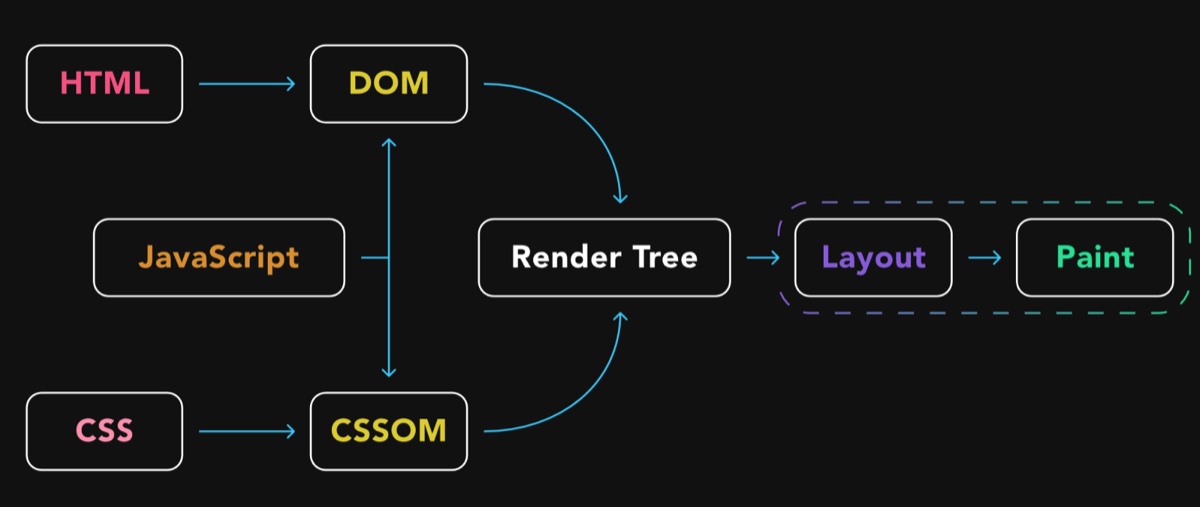
When a human visits your website, their browser downloads the HTML, loads the JavaScript files, executes them, and renders the final page. A client-side rendered React or Vue application might serve an initial HTML file that looks like this:
<html>
  <body>
    <div id="root"></div>
    <script src="/app.bundle.js"></script>
  </body>
</html>
The browser runs app.bundle.js, which populates <div id="root"> with your actual content product information, articles, navigation, everything. Humans see the finished page. AI crawlers see the empty div.
Google is the exception. Googlebot has a full rendering pipeline it downloads the page, executes JavaScript using a headless Chromium browser, waits for the content to load, and indexes the rendered result. This is why your JavaScript-heavy site might rank perfectly in Google while being completely invisible to ChatGPT, Perplexity, and Claude. The assumption that "if Google can index it, AI search can too" is wrong and it is costing businesses citations every day.
The Data Behind the Gap
Vercel's analysis of over 569 million GPTBot requests found zero evidence of JavaScript execution. Not partial rendering. Not delayed rendering. Zero. SearchViu's 2025 analysis confirmed the pattern across the broader AI crawler landscape: 69% of AI crawlers cannot execute JavaScript, missing dynamic content like product listings, user-generated reviews, and real-time updates.
Here is where each major AI crawler stands:
| Crawler | Owner | JavaScript Rendering |
|---|---|---|
| GPTBot | OpenAI / ChatGPT | No fetches JS files ~11.5% of the time, never executes |
| ClaudeBot | Anthropic / Claude | No downloads JS on 23.8% of requests, does not run |
| PerplexityBot | Perplexity | No HTML only |
| Bytespider | ByteDance (TikTok's parent) | No rendering capability |
| Googlebot | Google Search | Yes full rendering via headless Chromium |
| Google Gemini | Indirect uses Google's pre-rendered index | |
| AppleBot | Apple | Yes browser-based, processes JS, CSS, Ajax |
The scale makes this gap critical. Cloudflare's 2025 analysis showed GPTBot surged from 5% to 30% of all AI crawler traffic between May 2024 and May 2025, while overall AI and search crawler traffic grew 18% in the same period. That represents an enormous volume of visits where, for most JavaScript-rendered sites, your content simply does not exist at fetch time.
Why This Matters More Than You Think
AI engines cannot cite what they cannot read. When a user asks ChatGPT for product recommendations or expert information, the AI retrieves content from its crawled sources. If your pages returned empty HTML shells when GPTBot visited, your content is not in that retrieval pool regardless of how authoritative or relevant it is. Understanding how ChatGPT sources the web makes clear that citation depends entirely on what the crawler could read at fetch time.
The gap is widening, not shrinking. AI crawler volume is climbing fast, and AI-driven queries now represent a growing share of how consumers discover businesses. Meanwhile, your competitors with server-rendered sites have an automatic advantage they did not need to earn their content was simply available in the initial HTML response. Your client-side rendered content, no matter how superior, never entered the competition.
Diagnosis: Does Your Site Have This Problem?
Three quick methods confirm whether the rendering gap affects your site:
View source vs. inspect element. Right-click your page and select "View Page Source" this shows the raw HTML that crawlers receive. Then right-click and select "Inspect" this shows the rendered DOM after JavaScript executes. If View Source shows your content, you are fine. If it shows an empty container with script tags, AI crawlers cannot see your content.
Use curl to fetch your page. Run curl -s https://yoursite.com | head -100 in a terminal. The output is essentially what AI crawlers receive. If your headlines, paragraphs, and product data are there, your site is accessible. If you see only a JavaScript bundle reference, it is not.
Check your framework's rendering mode. If your site uses React (Create React App), Vue (default mode), or Angular without server-side rendering configured, it almost certainly serves empty HTML shells to crawlers. Next.js, Nuxt, and SvelteKit default to server-side rendering, but it is possible to override this verify your actual configuration.
The Fix: Server-Side Rendering and Its Alternatives

The core principle is straightforward: everything that matters for AI visibility must be present in the initial HTML response, before any JavaScript executes. Here are the main approaches, from most to least comprehensive.
Server-Side Rendering (SSR) generates the full HTML on the server for every request. When GPTBot fetches your page, it receives complete, content-rich HTML exactly what a browser would show after JavaScript renders. Best for dynamic content that changes frequently e-commerce product pages, news sites, personalised dashboards. Supported by Next.js (React), Nuxt (Vue), SvelteKit (Svelte), and Angular Universal. SSR is the gold standard because it serves the same complete HTML to every crawler, every time. Modern frameworks have dropped the performance cost significantly, and solutions like incremental static regeneration (ISR) eliminate most of the overhead.
Static Site Generation (SSG) pre-builds every page as static HTML at build time. Crawlers receive pre-rendered HTML with zero server processing delay. Best for content that does not change per-request blog posts, marketing pages, documentation. Trade-off: rebuilds required for content updates. For sites with thousands of pages, build times can become significant.
Prerendering / Dynamic Rendering detects crawler user agents and serves them a pre-rendered HTML version while serving the standard JavaScript application to regular browsers. Best for legacy JavaScript applications where migrating to SSR is impractical. Caution: Google describes dynamic rendering as a workaround, not a long-term solution. It works for AI crawlers today, but a proper SSR migration should be on your roadmap.
Hybrid approaches are the pragmatic choice for most businesses. Most modern frameworks support mixing rendering strategies per route. Your marketing pages and blog can be statically generated. Your product pages can use SSR. Your internal dashboard can remain client-side rendered since crawlers do not need to access it. Apply server rendering where AI visibility matters, keep client rendering where it does not.
Fixing the rendering gap is the prerequisite. Without it, nothing else in this guide matters AI crawlers cannot evaluate content they cannot see. Once your HTML contains your actual content, the next question becomes whether AI platforms can understand and trust what they find.
Part 2: Structured Data The Dual-Purpose Foundation
Every website now competes on two fronts. Traditional search engines decide whether to rank you. AI search engines decide whether to cite you. Structured data machine-readable code built on the Schema.org vocabulary is one of the few investments that improves your visibility on both.
Google uses structured data to display rich snippets, Knowledge Panels, and enhanced search features. ChatGPT, Perplexity, Gemini, and other AI platforms use the same structured data to identify entities, classify content, and extract the verifiable facts they include in their generated answers. Different consumers, same data layer.
How Search Engines Use Structured Data
Traditional search engines have used structured data for over a decade, primarily to power enhanced search features. Rich snippets star ratings on product pages, FAQ dropdowns, recipe cards, event dates, how-to steps increase click-through rates by 20-35%. They do not directly boost rankings, but the increased engagement signals relevance to the algorithm. Knowledge Panels are fed by Organization and Person schema, generating the information boxes that appear for branded searches. Without structured data, Google assembles these panels from third-party sources which means someone else controls your brand narrative. Feature eligibility for Google Shopping results, job postings, event listings, and course carousels all requires specific schema types. No structured data means no eligibility, regardless of how good your content is.
How AI Search Engines Use Structured Data
AI platforms process structured data differently, but the outcome is the same: better understanding leads to more visibility. There are four specific mechanisms:
Entity recognition. When ChatGPT encounters a query about your brand, it looks for machine-readable signals that confirm who you are. Organization, Person, and LocalBusiness schema provide verified facts name, location, services, founding date that the model can reference with confidence. Without these signals, AI systems must infer your identity from unstructured text, which introduces ambiguity.
Content classification. Article, HowTo, FAQPage, and Product schema tell AI crawlers what type of content they are reading before they parse a single paragraph. A page marked as FAQPage is more likely to surface for question-based queries. A page marked as HowTo is a candidate for procedural queries. This classification happens instantly with structured data without it, the AI must analyse the full page to make the same determination.
Factual extraction. Schema properties like datePublished, author, aggregateRating, offers, and address give AI agents discrete, verifiable data points. These are the building blocks of AI-generated answers. Content freshness signals like dateModified are particularly critical AI platforms weigh recent content more heavily when constructing answers.
Citation confidence. AI systems are more likely to cite sources they can verify. Structured data provides verification anchors a price claim backed by Product schema with an offers property is more trustworthy than the same claim in a paragraph. A business location confirmed by LocalBusiness schema is more citable than an address buried in footer text.
As Schema App's Martha van Berkel argues in Search Engine Journal, Google, Microsoft, and OpenAI have each acknowledged that structured data helps LLMs better understand digital content, with schema markup building the entity relationships that AI platforms need to comprehend a brand's offerings across channels. The shift is from schema as a search display trigger to schema as an AI context layer the territory where traditional SEO, AEO, GEO, and LLMO converge into distinct but overlapping disciplines.
The Evidence: Schema Implementation Rates Among Cited Pages
The Semrush study analysing 5 million URLs cited by AI platforms found that pages cited by AI platforms implement schema markup at significantly higher rates than the web average:
| Schema Type | ChatGPT Search | Google AI Mode |
|---|---|---|
| Organization | 25% | 34% |
| Article | 20% | 26% |
| BreadcrumbList | 15% | 20% |
| FAQ | 3% | 5.5% |
Google AI Mode showed higher schema implementation rates across every type measured. This makes sense Google has been encouraging structured data adoption for over a decade, and its AI system naturally gravitates toward pages that speak its preferred language.
The Unattributed Citation Problem
The practical risk of poor schema implementation is what some researchers call the unattributed citation problem. When an AI model cannot confidently link information back to a specific brand because Organization schema is missing or malformed it may attribute the insight to a competitor or present it without attribution entirely. You did the work; someone else gets the credit. That asymmetry is why schema coverage has shifted from "nice to have" to foundational infrastructure for AI visibility.
Part 3: Schema Types That Matter Most (Ranked by Impact)

Not all schema types carry the same weight. The types that drive the highest impact in traditional search also tend to be the most valuable for AI visibility. Prioritize based on your business type, but this is the rough order of impact most sites should follow.
Organization / LocalBusiness establishes your entity in Google's Knowledge Graph and gives AI agents verified identity data the schema-and-authority foundation that AI platforms reward. Every business website needs one of these on the homepage. LocalBusiness is essential for businesses with a physical location and includes address, opening hours, phone number, and service area all facts that AI agents use when answering local queries. This is the single most important schema type for brand-level visibility across both paradigms.
Article / BlogPosting is required for rich results on editorial content and used by AI agents for content classification, authorship verification, and freshness assessment. Always include headline, datePublished, dateModified, and author. The dateModified field directly affects whether AI engines cite your site, because AI platforms weigh recent content more heavily. Content decay is real and measurable.
FAQPage is one of the highest-impact types for traditional search (FAQ rich snippets) and AI search simultaneously. FAQ schema mirrors exactly how AI systems present information question-answer format. When your content already exists in the structure AI wants to use, you have done half their work for them. If your page answers common questions, wrap them in FAQ schema.
Product powers Google Shopping features, price comparisons, and availability indicators in search. For AI, Product schema provides the attribute-rich data that agents need when comparing options in response to product queries. Include name, description, price, availability, brand, and reviews.
HowTo unlocks step-by-step rich results in Google and structures content for procedural queries from AI agents. Each step becomes an extractable, citable unit. If you publish tutorials, guides, or instructions, this schema type makes your content modular and machine-readable.
Review / AggregateRating drives star ratings that increase click-through rates in traditional search and gives AI models quantitative quality signals. When an AI agent needs to recommend "the best" of something, aggregate review data provides evidence it can cite.
Service describes what you offer, with properties for service type, provider, and area served. Essential for service businesses that want AI agents to match them to specific service queries.
Part 4: Implementing Structured Data

JSON-LD (JavaScript Object Notation for Linked Data) is the format for structured data. Google officially recommends JSON-LD over older formats like Microdata or RDFa. JSON-LD sits in a <script> tag in your page's <head> section and does not alter your visible HTML, making it easy to implement and maintain.
Here is a simplified example of Organization schema in JSON-LD:
{
  "@context": "https://schema.org",
  "@type": "Organization",
  "name": "Your Company Name",
  "url": "https://yourcompany.com",
  "logo": "https://yourcompany.com/logo.png",
  "description": "What your company does in one sentence."
}
That block tells every search engine and AI crawler that this page belongs to a specific organization, what it is called, and where its logo lives no guessing required.
A complete Article example with every property AI platforms use:
{
  "@context": "https://schema.org",
  "@type": "Article",
  "headline": "Your Article Title",
  "description": "A concise summary of the article.",
  "datePublished": "2026-03-26",
  "dateModified": "2026-03-26",
  "author": {
    "@type": "Organization",
    "name": "Your Company"
  },
  "publisher": {
    "@type": "Organization",
    "name": "Your Company",
    "logo": {
      "@type": "ImageObject",
      "url": "https://yourcompany.com/logo.png"
    }
  },
  "image": "https://yourcompany.com/images/article-image.jpg",
  "mainEntityOfPage": "https://yourcompany.com/blog/your-article"
}
Method 1: Manual JSON-LD (Any Website)
This works on any website regardless of CMS. Identify the schema type that matches your page content on Schema.org Article or BlogPosting for a blog post, Organization for your homepage. Build the JSON-LD using Google's Structured Data Markup Helper or write it manually. Place the JSON-LD in a <script type="application/ld+json"> tag in your page's <head> section. If you are using a framework like Next.js, you can add it programmatically in your layout or page component. Validate with Google's Rich Results Test before publishing.
Method 2: CMS Plugins
If you use WordPress, plugins handle schema markup automatically. Yoast SEO adds Organization, Article, and BreadcrumbList schema out of the box; the premium version adds more types. Rank Math provides comprehensive schema support with a visual editor for 20+ schema types. Schema Pro is a dedicated schema plugin with conditional logic for applying different types to different page templates.
For Shopify, the theme typically includes basic Product schema. Apps like JSON-LD for SEO or Schema Plus add coverage for collections, articles, and FAQs. For Squarespace and Wix, built-in schema support covers the basics (Organization, Product, Article). For advanced types like FAQPage or HowTo, you will need to add JSON-LD manually via code injection.
Method 3: Google Tag Manager
If you manage multiple sites or want to deploy schema without editing page templates, Google Tag Manager can inject JSON-LD via custom HTML tags. Create a tag with your JSON-LD script, set the trigger to fire on the appropriate pages, and publish. This approach keeps your schema centralized and easy to update.
Attribute Depth: Where Most Implementations Fail
Adding schema tags is not a strategy. A strategy means understanding which pages need which types and ensuring the implementation is comprehensive enough to matter. The single most common failure mode is minimally populated schema @type and name and nothing else. Schema that thin is barely better than no schema at all, and research suggests it can actually underperform pages with no schema, because it signals neglect.
Fill every relevant property. A Product schema should include brand, offers, aggregateRating, description, image, and sku. An Article should include author, datePublished, dateModified, wordCount, and mainEntityOfPage. An Organization should include sameAs links to social profiles, foundingDate, numberOfEmployees, and contact information. The goal is zero ambiguity no page on your site should force a machine to guess what it contains.
Validation and Monitoring
Three tools to verify your implementation:
Google Rich Results Test at search.google.com/test/rich-results tests a specific URL and shows which rich results your markup is eligible for. The fastest way to validate individual pages.
Schema.org Validator at validator.schema.org validates JSON-LD, Microdata, and RDFa against the full Schema.org vocabulary. More comprehensive than Google's tool but does not show rich result eligibility.
Google Search Console the Enhancements section shows schema markup errors and warnings across your entire site. Check this monthly as part of a recurring SEO audit cadence to catch issues before they affect your visibility. Schema breaks silently a CMS update or template change can strip your markup without anyone noticing.
Common Schema Markup Mistakes
Marking up content that is not on the page. Google's guidelines require that schema markup reflects visible content. Adding FAQ schema for questions that do not appear on the page is a violation that can result in a manual action.
Using outdated or incorrect types. Schema.org evolves. Types get deprecated and properties change. If you added schema two years ago and have not reviewed it since, validate it again.
Forgetting dateModified. AI platforms weigh recent content more heavily. Update this field every time you refresh a page. A page last modified two years ago competes poorly against one updated last month, even if the content quality is identical.
Omitting the author property. Google's emphasis on E-E-A-T (Experience, Expertise, Authoritativeness, Trustworthiness) means author information matters. Include author with a name and ideally a link to an author page or profile.
Stopping at Organization schema. Many sites add Organization markup to the homepage and call it done. That is a start, but the real value comes from applying the right schema type to every key page articles, products, FAQs, services, and location pages.
Part 5: The Other Technical Factors
Structured data and rendering are the foundation, but the Semrush dataset and supporting research identify several more technical factors that distinguish AI-cited pages from the rest of the web.
URL Structure: Shorter and Clearer Wins
URL structure is a technical factor most businesses set once and never revisit. The Semrush data suggests it deserves more attention. Pages with slugs between 17 and 40 characters received the highest citation volume, with the peak range of 21-25 characters accounting for roughly 87,000 citations in the dataset. Very short slugs (1-5 characters) and very long slugs (56+ characters) appeared significantly less frequently among cited pages.
This aligns with how AI retrieval systems work. A URL like /technical-seo-ai-search immediately signals topic relevance, while /p?id=4829 or /2026/03/26/how-do-technical-seo-factors-impact-ai-search-visibility-complete-guide gives the model either too little or too much to parse. Use descriptive, hyphenated slugs that capture the page's primary topic in 3-5 words. Remove dates, categories, and filler words from your URL path. The deeper relationship between URL patterns and internal link architecture for AI search is worth a closer read if you are restructuring an existing site.
Page Speed and Core Web Vitals
AI platforms do not directly measure your page speed the way Google's Core Web Vitals do. But the Semrush data shows a strong indirect relationship: pages cited in top positions by AI platforms had higher engagement metrics longer session durations, more pages per visit, and higher conversion rates. Page speed is the invisible driver behind all of those metrics.
According to Google's web performance research, pages that load their main content within 2.5 seconds (the LCP threshold) see measurably higher engagement across every metric. Slow pages lose visitors before they can engage, which means less signal for AI models that factor in user behaviour patterns the same dynamic that underpins classic ranking fundamentals like Core Web Vitals and E-E-A-T. Google AI Mode in particular showed notably higher engagement metrics among its cited pages compared to ChatGPT Search suggesting that Google's AI system weighs engagement signals more heavily, likely because it has direct access to Chrome and Search Console data.
The thresholds that matter:
- Largest Contentful Paint (LCP): under 2.5 seconds
- Cumulative Layout Shift (CLS): under 0.1
- Interaction to Next Paint (INP): under 200 milliseconds
If your site exceeds any of these, those numbers are not just hurting your Google rankings they are reducing the engagement signals that AI models associate with citable content.
Mobile Optimisation
Every major AI platform crawls from a mobile-first perspective. Google switched to mobile-first indexing years ago. ChatGPT's web search, Perplexity, and other AI crawlers follow similar patterns evaluating the mobile version of your page as the primary representation.
A page that renders poorly on mobile broken layouts, unresponsive elements, text that requires horizontal scrolling creates two problems for AI visibility. First, the mobile render is what the AI crawler actually sees, so layout issues can obscure content. Second, poor mobile experience drives down the engagement metrics that correlate with AI citation rates.
Mobile optimisation in 2026 is not about having a responsive template. It is about ensuring that every interactive element, every image, and every content block delivers the same quality experience on mobile that it does on desktop.
Site Architecture and Crawlability
AI systems need to discover your content before they can cite it. The rise of agentic crawlers AI agents that traverse websites to gather information for answer synthesis means your site architecture matters more than ever.
Clean heading hierarchies (a single H1, logical H2-H3 structure) help AI models parse your content's structure. Clear internal linking helps them discover related pages. A well-maintained XML sitemap ensures nothing important is hidden behind JavaScript rendering or orphaned from the main navigation. Well-structured sections with clear headings also aid content chunking for AI visibility, letting AI engines extract specific passages to cite.
The fundamentals of crawlability have not changed they are covered in depth in our analysis of SEO principles that still apply in the AI era. What has changed is the number of systems crawling your site. Beyond Googlebot, you now have ChatGPT's crawler, PerplexityBot, ClaudeBot, and dozens of agentic crawlers that need clean, parseable HTML to do their job. If your robots.txt blocks AI crawlers, your content cannot be cited.
HTTPS and Security Signals
HTTPS has been a Google ranking signal since 2014. In AI search, it functions more as a trust baseline a necessary condition rather than a differentiator. The vast majority of pages cited by AI platforms in the Semrush study used HTTPS, which reflects the web's overall migration toward encrypted connections.
The more important security consideration for AI visibility is whether your site actively blocks AI crawlers through aggressive WAF configurations, CAPTCHA walls, or bot-detection systems that treat AI user agents as threats. Some businesses inadvertently block the very crawlers they want to be cited by. Review your security configuration to ensure you are blocking malicious bots without excluding legitimate AI crawlers. ChatGPT, Perplexity, Google AI, and Claude all have documented crawler user agents your server should recognise and allow them.
Part 6: The Emerging AI Discovery Layer
The relationship between websites and AI systems is evolving beyond simple crawling. Two emerging standards are worth watching.
llms.txt is a proposed protocol for AI-friendly site directives (similar to robots.txt) that provides AI systems with a structured overview of your site's content, purpose, and key pages. It gives AI crawlers a roadmap rather than forcing them to discover your site structure through brute-force crawling.
Structured feeds and APIs designed specifically for AI consumption are beginning to appear. Rather than relying on crawlers to parse HTML, some sites now expose machine-readable content endpoints that AI systems can query directly.
These are supplements to server-side rendering and structured data, not replacements. The HTML your crawlers receive remains the primary channel but providing additional AI-friendly access points can improve how completely and accurately AI engines understand your content.
Priority Order: What to Fix First
The Semrush dataset and supporting research converge on a clear priority order. If you have limited time, work through these in sequence:
- Schema markup implement Organization, Article, and BreadcrumbList as a minimum, with FAQPage, Product, or HowTo where the content fits
- Page speed get LCP under 2.5 seconds and fix layout shift (CLS under 0.1)
- URL structure aim for descriptive slugs of 17-40 characters
- Mobile experience ensure full feature parity with desktop
- Crawlability verify AI crawlers can access your content (rendering, robots.txt, sitemap)
- Security HTTPS baseline plus AI-crawler-friendly bot management
If your site has a rendering problem, that moves to position zero it blocks every other item on this list. AI crawlers cannot evaluate content they cannot see.
What This Means for Your AI Visibility Strategy
The combined research reinforces a principle that experienced SEOs already understand: technical foundations are not glamorous, but they are load-bearing. A beautifully written page with no schema, slow load times, broken mobile experience, and a cryptic URL is working against itself in both traditional and AI search. Technical work sits inside a wider system see the end-to-end framework for AI search visibility for how content, entity, and measurement layers fit together.
The difference in 2026 is the stakes. In traditional search, poor technical SEO might cost you a few positions in a list of ten results. In AI search, there is no list you are either cited or absent. Technical issues that cause a minor ranking drop in Google can cause complete invisibility in AI-generated answers.
Once technical foundations are in place, the quality layer takes over: citable content structured for AI extraction, topical authority, strong AI trust signals, and the full AI visibility checklist. Technical SEO makes you readable. Quality makes you citable. Both are required.
Frequently Asked Questions
What is the best format for schema markup?
JSON-LD (JavaScript Object Notation for Linked Data) is the format recommended by Google. It sits in a script tag in your page's head section and does not alter your visible HTML, making it easy to implement and maintain. Google officially recommends JSON-LD over older formats like Microdata or RDFa, and every major AI search engine Google, Bing, Perplexity, ChatGPT processes JSON-LD.
Does Google ranking guarantee AI search visibility?
No. Googlebot has a full JavaScript rendering pipeline using headless Chromium, but GPTBot, ClaudeBot, and PerplexityBot do not execute JavaScript at all. A JavaScript-heavy site can rank perfectly in Google while being completely invisible to ChatGPT, Perplexity, and Claude. The assumption that "if Google can index it, AI search can too" is incorrect.
Which schema types should I implement first?
Start with Organization schema on your homepage, WebSite schema with a search action, and BreadcrumbList schema for site hierarchy. Then add Article or BlogPosting schemas to all editorial content, and FAQPage schema to any page that answers common questions. FAQPage is one of the highest-impact types for both rich snippets and AI citation.
What is the minimum structured data every website should have?
At minimum: Organization schema on the homepage, WebSite schema with search action, BreadcrumbList for site hierarchy, and Article or BlogPosting schema on all editorial content. If your site answers questions, add FAQPage schema. This baseline covers both Google's rich result requirements and the entity signals AI platforms need.
What URL slug length is optimal for AI citations?
Pages with URL slugs between 17 and 40 characters received the highest AI citation volume in the Semrush study, with the sweet spot at 21-25 characters. Descriptive, hyphenated slugs that capture the page's primary topic in 3-5 words perform best. Very short slugs and very long slugs appear significantly less frequently among AI-cited pages.
Can blocking AI crawlers in robots.txt hurt my visibility?
Yes. If your robots.txt blocks AI crawlers like GPTBot, ClaudeBot, PerplexityBot, or Google-Extended, your content cannot be cited by those platforms. Some businesses also inadvertently block AI crawlers through aggressive WAF configurations or CAPTCHA walls that treat AI user agents as threats.
How do I validate my structured data?
Use Google's Rich Results Test at search.google.com/test/rich-results to validate individual pages. The Schema.org Validator at validator.schema.org provides more comprehensive validation against the full vocabulary. Check Google Search Console's Enhancements section monthly to catch site-wide issues.
How do I check if AI crawlers can see my website content?
Right-click your page and select "View Page Source" to see the raw HTML that crawlers receive. If your content (headlines, paragraphs, product data) appears in the source, AI crawlers can read it. If you only see an empty container with script tags, your content is invisible. You can also run curl -s https://yoursite.com in a terminal to see exactly what AI crawlers receive.
The businesses that get technical SEO right for AI search are not learning new skills they are applying existing skills to a new set of evaluators. Evaluators that happen to be faster, more thorough, and less forgiving than the ones that came before.
To see exactly where your site stands on these technical factors, run a free AI Readiness Scan it checks structured data coverage, content clarity, and technical signals across the dimensions AI platforms evaluate, in under a minute. For the complete picture including live AI citation testing across nine AI platforms, per-market AI Overview analysis, and an AI-generated strategic roadmap the AI Readiness Audit covers the full scope of what separates cited sites from invisible ones.